

Open Dental’s latest version, 26.2, has been released as stable! We added 17 features requested specifically by our users as well as many other changes and enhancements. Read on to learn more!
TECH TIP: Once you’ve updated your database to 26.2, access up-to-date help pages by using the ? from any window in Open Dental.

In This Post
Glidewell Integration
Appointments Module
Account Module
Chart Module
Manage Module
Insurance
Tools
eServices
Miscellaneous
Glidewell Integration
A new integration with Glidewell, a laboratory service, has been added to Open Dental. If you are using a Medit or iTero scanner for intraoral imaging, you can now send images and lab cases directly to Glidewell without needing to leave Open Dental.
Appointments Module
Search for multiple blockouts from the Advanced Appointment Search
You can now select one or more blockouts when using the Advanced Appointment Search. This is especially useful when using Block Scheduling.

Practice or Clinic schedule notes can be viewed from the Appointments Module
When a Practice/Clinic Note or Holiday is entered on the schedule, it can quickly be viewed from the Appointments Module in the upper left corner.

Account Module
DentalXChange Attachments Enhancement
The DentalXChange Attachment Service, which is a service directly integrated in Open Dental, now supports PDF documents.
Changes when generating individual statements
Generating individual statements now looks a little different. The statement dropdown is now a window and we’ve moved around details in the Statement Options window.

Chart Module
Graphical Charting Enhancements
A new preference has been added to display an extraction graphic after the procedure is completed. Previously, the X’s did not display. Now they do. The preference is enabled by default.
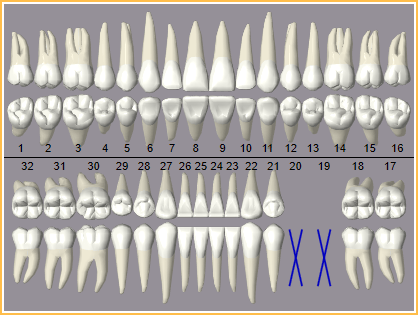
If you want to quickly identify if a patient has occlusal guards or clear aligners, we added a new procedure code Paint Type for custom text. This is displayed outside of the tooth chart. When a procedure has TextBelow set as the Paint Type, the procedure’s custom text displays below the odontogram.

Perio Chart Enhancements
We’ve added a few new features to make perio charting a breeze.
You can now CTRL+Click to select multiple different cells to chart probing depths, plaque, calculus, bleeding, or suppuration.

You can even select multiple cells for any row instead of just for probing depths (by clicking and dragging, OR using CTRL+click!).

Use the new Lock checkbox next to Plaque, Calculus, Bleeding, and/or Suppuration to add that value to any cell you click on (or click and drag for multiple). This is especially helpful to chart things like full-mouth bleeding.

Manage Module
Updates to Billing window layout
The Billing Options window looks a little different. The Electronic Billing settings have been moved to their own window.

Along with that change, the Billing Defaults window has been reconfigured, and some settings can now be set per clinic.

Time cards allow future clock outs
Future clock out events can be added ahead of time for the current day, in case payroll processes on the same day as the end of the pay period.

Insurance
Default claim form by provider
Each provider can now have a default claim form set. This may be especially helpful for our Canada users who have a mix of dentists and independent hygienists.

New automation trigger when a procedure is not billed to insurance
You may find yourself forgetting to inform a patient when their carrier doesn’t cover a specific service. To help, we’ve added a new automation trigger when you check Do Not Bill to Ins on a procedure. This trigger can be set for only selected carriers. In the example below, a popup would appear reminding you to remind the patient.

Tools
Copy all fees for one procedure code to another
A new Copy by Code tool allows you to copy the fees from one procedure code to another across all fee schedules. This can be helpful when the ADA discontinues one code and replaces it with a new one.

Automated backups for MariaDB databases
MariaDB databases, one of the two database management systems we support, can now be automatically backed up using the built-in Backup Tool in Open Dental.

Additionally, these databases can be restored using the new standalone MariaDB Backup Restore tool.
Not sure which database management system you’re using? You can find out by going to Help, About. If your Service Comment shows MySQL, give us a call to see if upgrading to MariaDB is an option for you.
eServices
Set a limit on the range of future appointments with Web Sched
Web Sched now has an option to limit how far in advance patients can schedule appointments online for New, Existing, and Recall appointments.

Import vital signs with eForms
Text Fields on eForms have new database links to import vital signs into the Medical Information for a patient.

New replacement tag in Automated Messages for eClipboard Web
New Patient Thank Yous, Auto Thank Yous, and eReminders can now include the [EClipboardWebURL] tag so that patients are directed to their online forms.

Miscellaneous
- Added a new preference to automatically switch patients’ prophy or perio recall based on completed procedures.
- PayConnect 2.0 is now compatible with all versions of Open Dental Cloud.
- Updated Rx Norms to 2026.
- The Patient Portion Uncollected report now shows prior balances and considers payment plans.
- Added bridge to Alliedstar Connect.
There’s a lot to explore in 26.2, and we hope these updates make your day-to-day a little smoother. Have questions? Reach out to Open Dental Support anytime!